The best part about Facebook is also the worst part.
The best part: Being able to directly connect with your customers, and being able to post ads and promotions right in your customers faces.
The worst part: Users are not responsible. The average user “likes” an average of 100-150 pages. Have you ever seen a news feed? Look at the one below:
Customers ignoring the businesses
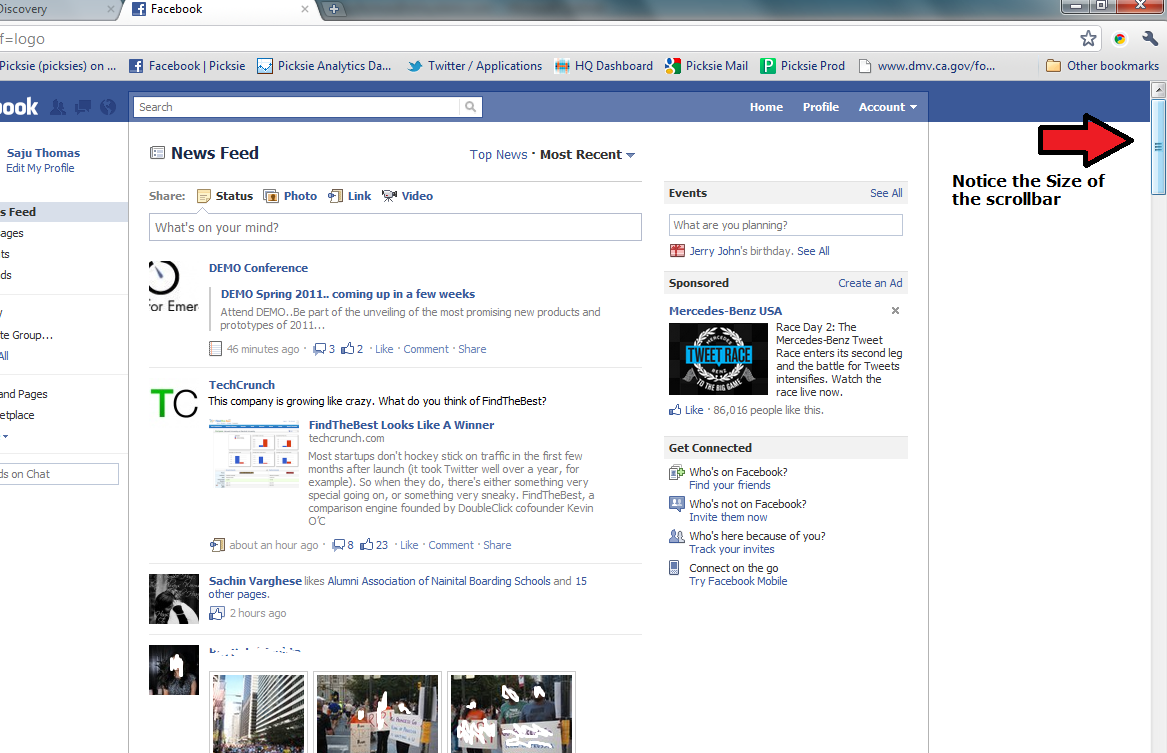
You are competing with screen space. Every time your page posts something, there are 99 other pages who may be posting something. There are many things you can do to be more prevalent, but let’s start slow. Here are a few things you can do to void being ignore by your followers:
Avoiding being ignored:
- Constantly generate new content
- Avoid re-posting
- Diversify your content (images, videos, text, sound bytes, etc)
- Avoid generic posts
- Ask questions
- Be relative to your followers. Don’t post news about opera when you are trying to selling more skateboards.
Businesses ignoring their customers
Customer service queries and comments on Facebook are being ignored by businesses! A new report by STELLAService, which rates the customer service of retail websites highlights how they recently posted general service questions on 20 top retailers’ Facebook pages to test how they conduct customer service on the social network.
Five of them failed to answer a customer question on their Facebook wall within two days, and even fewer replied to inquiries asked as comments on their posts.Seven of them actually deleted the question from their wall erasing any record of the customer enquiry!
Whether it’s on-line or off-line, ‘Being easy to deal with’ and ‘Dealing with disappointment’ are fundamental ingredients of customer focused businesses, and clearly some aren’t delivering in these areas.
OK, so Facebook might not be for you personally, but if it’s what your customers use, and you are ignoring them, then you could be in trouble – the big difference between ’social media’ customer comments is that everyone else can see that your doing so!
So, Face Up to it! Are you listening to your customers – online and offline?

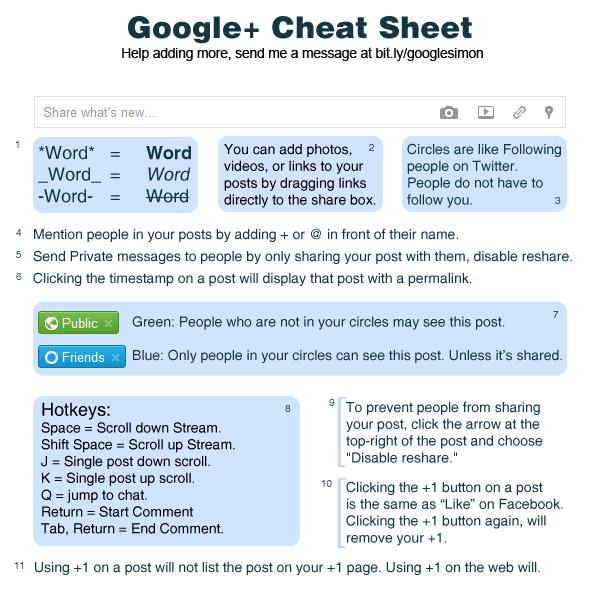
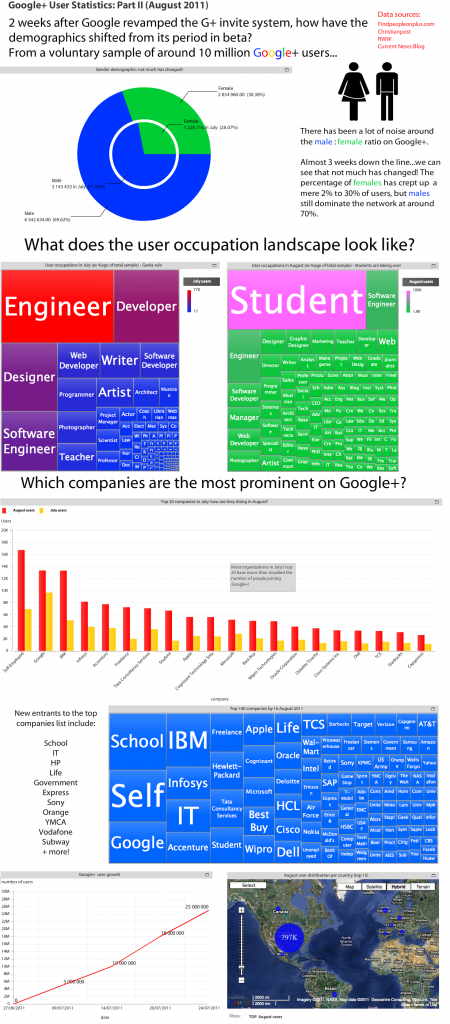
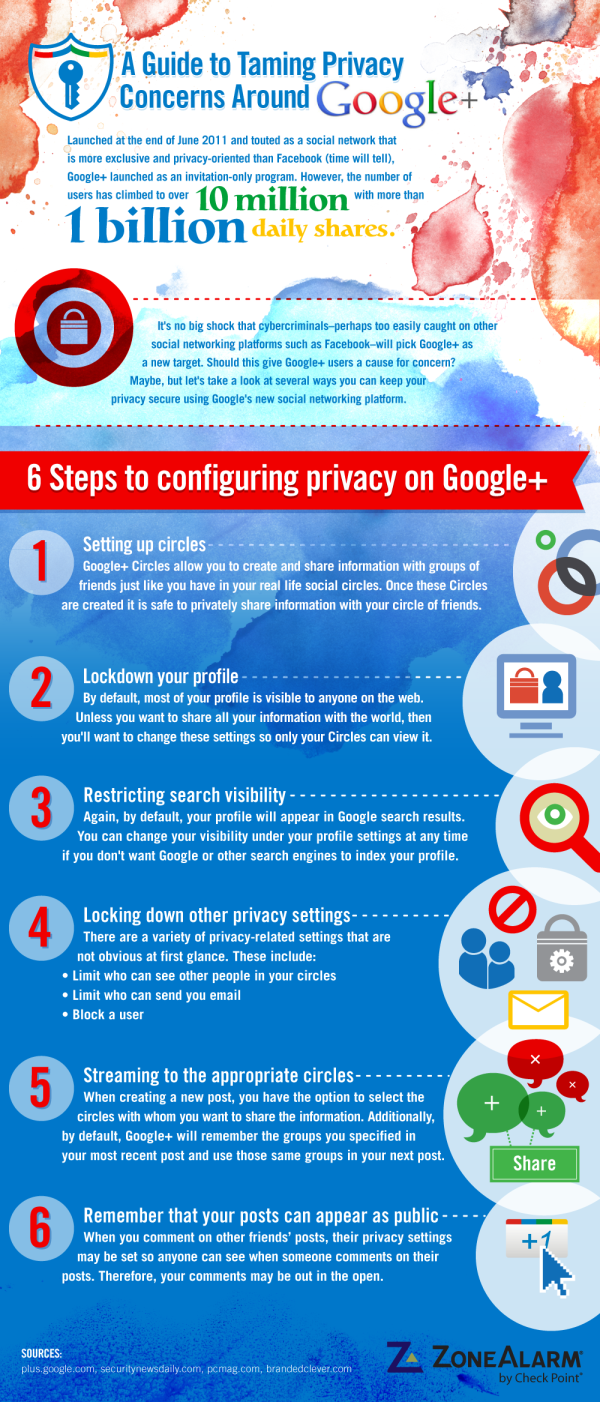
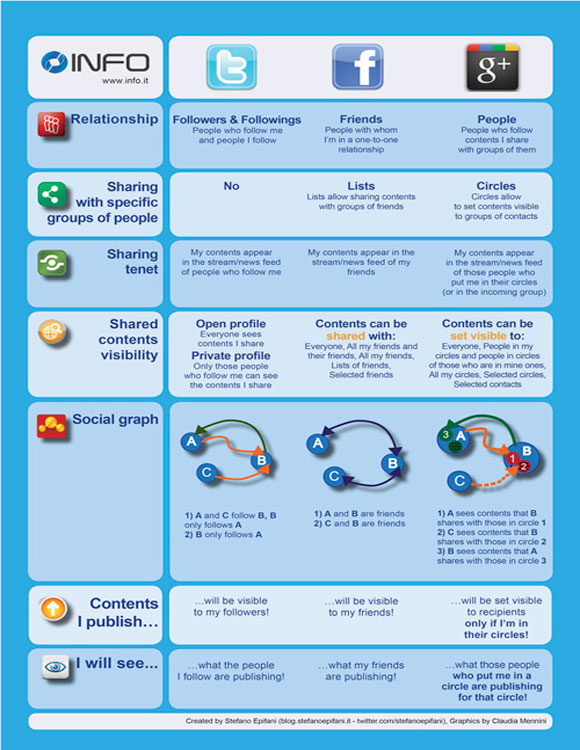
Google+ Vocabulary: Quick Reference Glossary <=CLICK HERE FOR FULL IMAGE
Stream – the list of messages that is displayed on the Google+ home screen and for each Circle of contacts
Hangout – a platform for group video chatting and collaboration that is used by Google+ members
Circle – the method of organizing connections into groups for more targeted sharing and better privacy
Google Profile – your personal home on Google+, which allows you to share interesting, work experiences, personal information, and much more
Sparks – the magazine of Google+, which bring together information on a topic for easy viewing. Enter a keyword, and see public Google+ posts on that topic.
Chat – a method for sending short messages to other Google+ members who are also signed in to Google+
+1 Button – the equivalent of the Facebook Like button for Google+ and Google Search. A user can +1 an item shared on Google+ as well as a search engine result link returned by a Google search.
Comment – a response to a user’s Google+ post
Share – allows you to share a message that someone else created with your followers (similar to a retweet on Twitter)

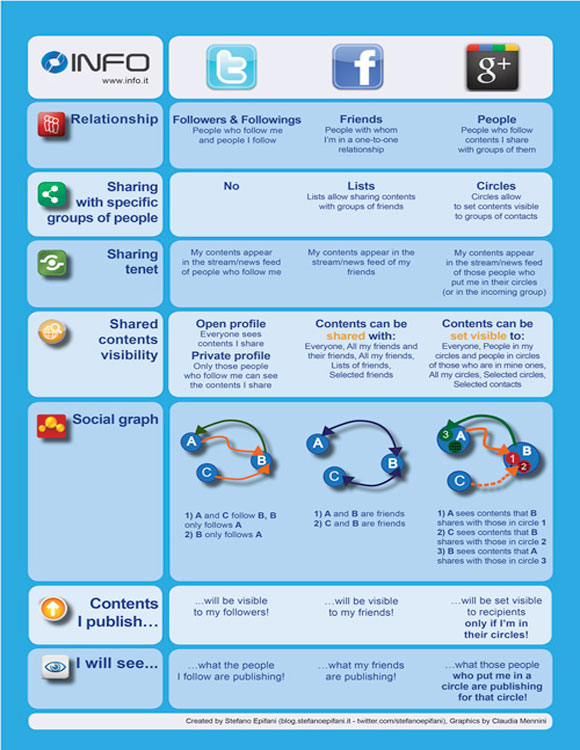

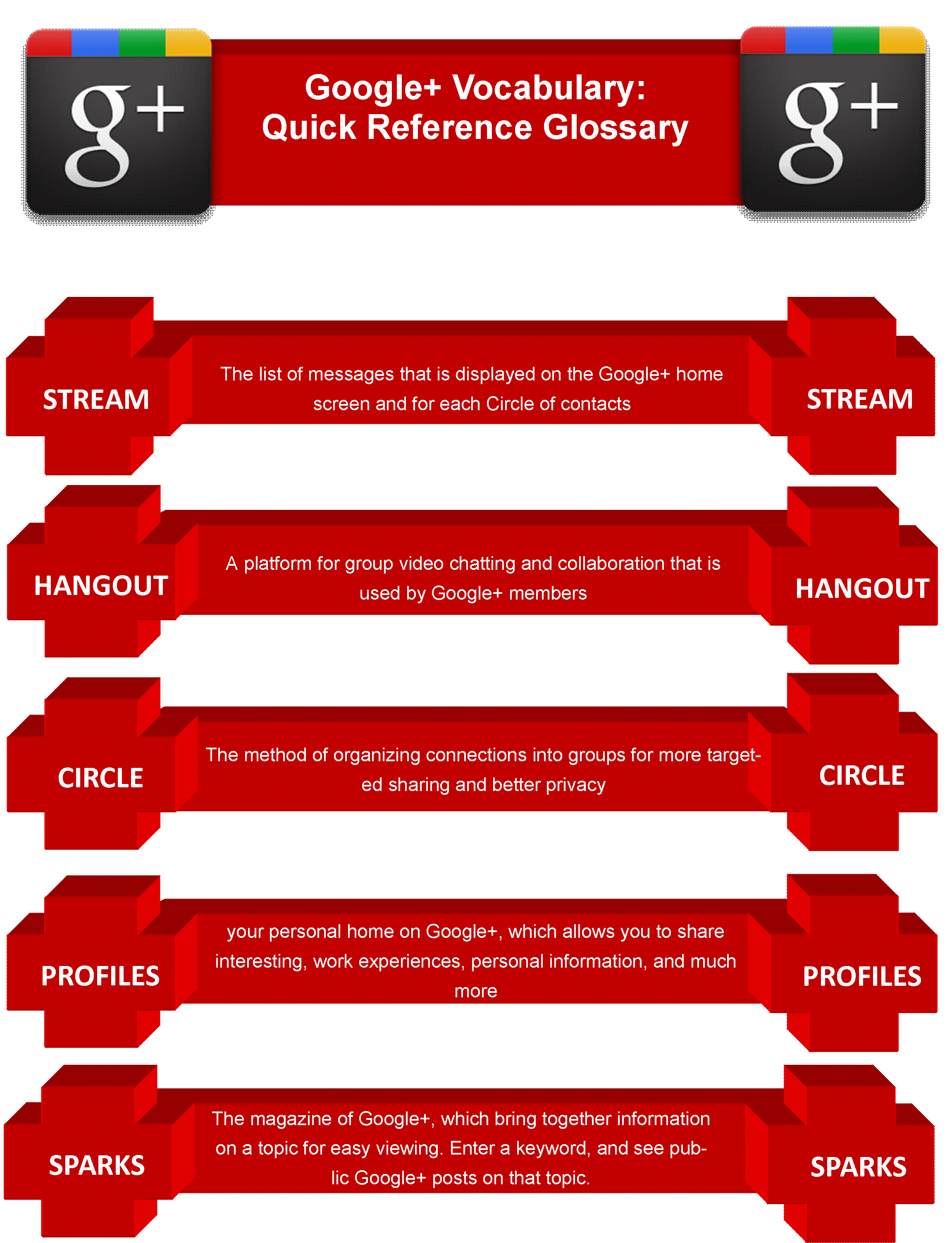
Google+ Vocabulary: Quick Reference Glossary <=CLICK HERE FOR FULL IMAGE
Stream – the list of messages that is displayed on the Google+ home screen and for each Circle of contacts
Hangout – a platform for group video chatting and collaboration that is used by Google+ members
Circle – the method of organizing connections into groups for more targeted sharing and better privacy
Google Profile – your personal home on Google+, which allows you to share interesting, work experiences, personal information, and much more
Sparks – the magazine of Google+, which bring together information on a topic for easy viewing. Enter a keyword, and see public Google+ posts on that topic.
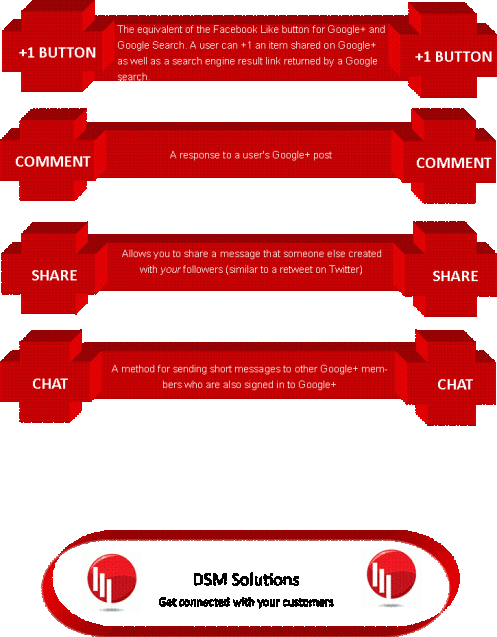
Chat – a method for sending short messages to other Google+ members who are also signed in to Google+
+1 Button – the equivalent of the Facebook Like button for Google+ and Google Search. A user can +1 an item shared on Google+ as well as a search engine result link returned by a Google search.
Comment – a response to a user’s Google+ post
Share – allows you to share a message that someone else created with your followers (similar to a retweet on Twitter)

10 Small Business Internet Marketing Tips
Looking for some basic Internet marketing tips for your small business? While there are hundreds of suggestions we can make, here’s a list of 10 that we think might be the most useful for 90% of small business owners.
1. In the words of Ron Simon, “What the hell are you trying to do?” What is the goal of your website? Ultimately, it should be to drive more business, but how exactly will it do that? Start with one goal – such as increasing the number of phone calls – and branch out from there. It’s important to set goals, but it’s just as important to come up with a system for measuring those goals.
 2. Evaluate your website’s content – Content is King. What does your website say? Is the content unique and useful? Will people learn anything when they visit your site? When was the last time you added new content? Does your website have content worth reading? Does your content match your business goals?
3. The <title> tag.
Visit your website. Look at the very top of your browser window. What do you see? Does it describe the page you’re looking at? Is it a unique description? Does it contain the keywords you want people to associate with that page of your website? If you’re a local business, does it contain your key local search keywords? If you can’t answer ‘yes’ to all these questions, check out this article all about title tags.
4. Call tracking and analytics. You can’t improve upon what you can’t measure. Analytics provide a tremendous amount of incredibly useful data, such as where your website visitors come from, how long they stay, and what they do on your site. Google analytics is free and pretty darn good, and we recommend it. We also recommend you make sure you can track every lead that’s generated by your website.
If you don’t have a dedicated phone number for the website that you can track calls on, visitMongoose Metrics. They’ll issue you a unique tracking phone number and then forward every call you get to your main number while tracking the number of calls you receive, who called, how long the call lasted…etc. It’s surprisingly inexpensive.
5. Take advantage of free local business directories. There are a few great local business directories that are completely free. Get your business listed in each of the directories below and you’ll see a boost in website visitors and hopefully a boost in business too. (By the way, we don’t advocate paying for any directory listings anywhere unless you’ve got a very good reason.)
6. Check out your competition.
Visit your competitors’ websites. Do searches for keywords related to your business. Find out what others in your vertical are doing and saying. This is a great way to get ideas and take stock of your own company’s online marketing efforts.
7. Repeat after me – “I have an ugly baby.”
A lot of business owners love their websites, but the first step to improving your website is to admit that it has some deficiencies. No website is perfect, and every website can use improvement. If you have a website, you have an ugly baby [sorry]. Just how ugly your website is, however, is open to discussion.
8. Start blogging. Every business, and we mean every business, has something to gain by blogging and absolutely nothing to loose. The list of benefits is long, but here’s a short list of reasons small businesses should blog.
9. Post online video. Video is still a little cutting-edge for some, but the benefits can’t be understated. Online video is the wave of the future, and every business needs to have something on YouTube, Metacafe, etc. If you’re concerned about expense here, keep in mind there are some low-budget options that won’t damage your brand while still providing concrete benefits.
10. Contact us. We can help your small business rise above the rest. Contact us so we can discuss your business and your basic goals – our initial consultation is free of charge.
What Is a Title Tag?
The title tag has been – and probably will always be – one of the most important factors in achieving high search engine rankings.
In fact, fixing just the title tags of your pages can often generate quick and appreciable differences to your rankings. And because the words in the title tag are what appear in the clickable link on the search engine results page (SERP), changing them may result in more clickthroughs.
Search Engines and Title Tags
Title tags are definitely one of the “big three” as far as the algorithmic weight given to them by search engines; they are equally as important as your visible text copy and the links pointing to your pages – perhaps even more so. Yet, even though this has been common knowledge among SEO professionals for at least 10 years, it is often overlooked by webmasters and others attempting to optimize their websites for targeted search engine traffic.
Do Company Names Belong in the Title Tag?
The answer is a resounding YES! I’ve found that it’s fine to place your company name in the title, and (gasp!) even to place it at the beginning of the tag! In fact, if your company is already a well-known brand, I’d say it’s essential. Even if you’re not a well-known brand yet, chances are you’d like to be, right? The title tag gives you a great opportunity to further this cause.
This doesn’t mean that you should put *just* your company name in the title tag. Even the best-known brands will benefit from a few good descriptive phrases added, because they will enhance your brand as well as your search engine traffic. The people who already know your company and seek it out by name will be able to find you in the engines, and so will those who have never heard of you but seek the products or services you sell.
Title Tags Should Contain Specific Keyword Phrases
For example, if your company is “Johnson and Smith Inc.,” a tax accounting firm in Texas, you would want your company’s site to appear in the search engine results for searches on phrases such as “Texas tax accountants” and “CPAs in Texas.” (Be sure to do your keyword research to find the best phrases!) If you prefer to work with people only in the Dallas area, you’d need to be even more specific by adding geographical modifiers to your title tags, such as “Dallas tax accountants.”
Using our Dallas accountant example, you might create a title tag like this one:
Johnson and Smith Tax Accountants in Dallas
or you might try:
Johnson and Smith – Dallas CPAs
However, there’s more than enough space in the title tag to include both of these important keyword phrases. I find that using 10 to 12 words in my title tags works great.
One way to include two keyphrases would be like this:
Johnson and Smith – Dallas Tax Accountants – CPAs in Dallas, TX
I’ve always liked the method of separating phrases with a hyphen; however, in today’s competitive marketplace, how your listing appears in the SERPs is a crucial aspect of your SEO campaign. After all, if you have high search engine rankings but your targeted buyers aren’t clicking through, it won’t do you much good.
The idea is to write compelling titles as opposed to simply factual ones, when you can. But it also depends on the page, the type of business, the targeted keyword phrases, and many other factors. There’s nothing wrong with the title tag in my above example. If you were looking for a tax accountant in Dallas and saw that listing at Google, you’d probably click it. (Note: Don’t worry if some of your visible title tag info gets cut off when the search engines display your page’s info; they are still indexing all the words contained within it.)
Still, you could make it a readable sentence like this:
Johnson and Smith are Tax Accountants and CPAs in Dallas, TX
I’m not as thrilled with that one. I had to remove the exact phrase “Dallas Tax Accountants” because it wouldn’t read as well if it said:
Johnson and Smith are Dallas Tax Accountants and CPAs in Dallas, TX
It sounds redundant that way, as if it were written only for the search engines.
In the end, it’s really a personal preference.
Don’t make yourself crazy trying to create the perfect title tag, because there’s just no such thing. Most likely, either of my examples would work fine. The best thing to do is to test different ones and see which bring the most traffic to your website. You might very well find that the second version doesn’t rank as well, but gets clicked on more, effectively making up the difference.
Use Your Visible Text Copy as Your Guide
I prefer to create my title tags *after* the copy on the page has been written and optimized. I need to see how the copywriter integrated the keyword phrases into the content to know where to begin. If you’ve done a good job with your writing (or better yet, hired a professional SEO copywriter), you should find all the information you need right there on your page. Simply choose the most relevant keyword phrases that the copy was based on, and write a compelling title tag accordingly. If you can’t seem to get a handle on the most important phrases for any given page, you probably need to rewrite the page content.
I recommend that you *don’t* use an exact sentence pulled from your copy as your title tag. And don’t use the exact wording that’s in your top headline. It’s much better to have a unique sentence or a compelling string of words in your title tag.
You’ll want to watch out for certain website content management systems (CMS) and blog software that automatically generate the title tag from information you provided elsewhere. Some, in fact, default to the same exact title tag on every page, which is the best way to kill your search engine leads! The good news is that most of today’s CMS’s and blog software have workarounds so that you can customize your title tags fairly easily. If yours doesn’t, or your developer claims they can’t do this, then you’ll want to find a new developer or CMS as soon as possible!
Marketing tips for restaurants – Enhanced with social media
Advice on how to boost sales and stand out from the crowd
Surprise me
In order to open their wallets and pocketbooks, today’s timid consumers want something special. We’re not talking about a surprising discount, but a surprising call to action. If recession-weary consumers are going to let the moths out of their coin purses, it had better be good. Creativity is the key.
Social media channels such as Facebook or Twitter present restaurant owners with many creative tools. These channels allow the restaurant to act like a person, and allow their customers to interact and converse with it as if it were a person.
Pay attention to growing Hispanic influence
The Hispanic influence in the United States is growing. The future of our nation and the restaurant industry depends on what happens to this population. How your brand markets itself effectively to this group of increasingly influential customers is key in the years to come.
Certain social media channels like Facebook allow you create promotions and advertisements that target specific demographics. The classic example I like to use is that you can target a “Left-handed, red-headed female between ages 20-35 who live in Sacramento California”. It really is that specific, and you can drill down even more than that. Use this tool to target that growing Hispanic population in your local area.
In pursuit of the social customer
While who owns social media may be the wrong question to ask, social media for the time being appears to live in one primary department. Over time, however, social media will extend the capacity of any business affected by outside behavior.
2011 was a pivotal year for social media. While many brands believe in its importance, there is still a great deal to learn. What’s clear, however, is just how early brands are in this growth curve. Social consumers are expanding beyond the Millennial demographic, as social-savvy individuals are migrating from the edge to the center of technology adoption and prowess. As they do, social networks and new-media apps and services become their platforms of choice.
New dayparts and revenue channels
There will be a greater focus on developing new dayparts for restaurant marketers. Breakfast is one of the fastest-growing dayparts in the industry today. However, it is one of the hardest dayparts for convincing consumers to switch to your brand or to change their morning eating habits.
Social media is a part of your customers’ daily routines. Everyone is different, but 90% of all social media users check their accounts in the morning before beginning their day. This is where you can convince your previous customers (your followers) to choose your restaurant over another. Time your specials and advertisements so that they appear during the times your customers are online check their Facebook page or Twitter account.
As all restaurant owners know, it is also important to gain new customers. Coupons, billboards, print and other advertisements can be expensive and hard to measure success. Be proactive and begin using 21st century marketing and talking to your customers where they prefer – online. Make sure your online reviews are being monitored. Online review sites like Yelp and Google Places are decision makers for customers looking for a new place to eat. Often, there is one bad review that sits on the top of these sites and is the first to be read by potential customers. Even more often, restaurants who do not participate in monitoring their reviews can be automatically categorized as something other than a restaurant.
Managing your online reviews not only prevents mishaps like these, but you can also use them to convert potential customers to followers. Once they are followers, you already have their interest. They are watching your Facebook page, and seeing what you post. They want to see what kind of restaurant you are, what your prices are, the food serve, the atmosphere and your overall image.
Catering is not a new revenue channel, but with today’s social-media applications, catering is a whole new ballgame for restaurant marketers. Today’s savvy restaurant marketers are using online catering resources, and some are creating custom catering platforms, such as Boudin Bakeries, which has increased catering sales 300 percent in nine months with an enterprise, Web-based program.
Offering products online, bottling signature items and partnering with grocery retailers is a must for restaurant marketers. Huge brand awareness is garnered by having your brand in the grocery store freezer or bottled-products sections. Taking your signature menu item and partnering with a food manufacturer to produce proprietary products is a channel worth exploring.
Integrate, integrate, integrate
Integration of all marketing communications is essential to garnering the best results. For example, if you plan to introduce a new menu item, how will you communicate that to drive awareness and trial? It’s about consumer touch points. Every place a guest can see, hear or touch has to be part of the marketing plan. The e-mail blast, the Facebook post, the tweet, and coupon drop and advertising all have to work together to create a louder voice.
Post your changes on Facebook and ask for feedback from your customers before you order 500 new menus. You might find out that 30% of your customers don’t like #4 on your menu. Maybe 20% of your customers say: “Hey, where are the vegetarian options?”
You can learn a lot from your customers by utilizing the channels that allow you to communicate with them.
Communicate sustainability, health and ingredients
Consumers want to know the source of their food. Those brands that can articulate their ingredients and product sourcing are winning big with consumers. Marketers must weave multiple messages to include social responsibility, recycling and product sourcing, and to share calories, the amount of sodium and other nutrition data. Creating communications to get “credit” with guests is imperative today.
Have all of this information available to your customers on your Facebook page. You avoid expensive printing costs, and show that you care about the food that you serve. Your customers will thank you and spread the word for you.
Responsible marketing
Today’s marketers must be socially responsible. With soy-based inks and recycled-paper products all readily available, all point-of-purchase materials should be printed using recyclable materials whenever possible. Consumables, such as cups, tray liners and other logoed to-go packaging, need to be made with recycled materials for today’s green and sustainable-savvy consumers.
There’s nothing more sustainable than digital print – use it to your advantage and promote your “green” efforts to your customers through your social media channels.
Get moving
This isn’t first lady Michelle Obama’s cry; it’s time for restaurant marketers to get moving. Local store marketing is still the most effective and least expensive strategy for smart restaurant marketers. Most patrons of your restaurant come from within the three-mile radius, and being a part of the community has never been more important to stand out from the competition. Give your general managers and franchisees tools and tips, and send them into their three-mile radius to introduce themselves. Arm them with menus, offers and samples. When they get moving, so will your sales.
Utilize your social media channels to connect with other community pages and businesses. Contact these businesses and create win-win scenarios by cross-promoting and advertising. If you’re a breakfast only restaurant, you can make recommendations about your favorite steak house. The steakhouse can then return the favor and make their recommendation for their favorite breakfast place (your restaurant. The possibilities are endless.

Yelp makes it easy for people to find great local restaurants, read/make reviews and make decisions based on the reviews.
10 Things You Should Know About Yelp
- Yelp was founded in 2004 to help people find great local businesses like dentists, hair stylists and mechanics.
- Yelp had an average of approximately 71 million monthly unique visitors in Q1 2012.
- Yelpers have written over 27 million local reviews.
- In addition to reviews, you can use Yelp to find events, lists and to talk with other Yelpers.
- Every business owner (or manager) can setup a free account to post photos and message her customers.
- Yelp makes money by selling ads to local businesses – you’ll see these clearly labeled “Yelp Ads” around the site.
- Paying advertisers can never change or re-order their reviews.
- Yelp has an automated filter that suppresses a small portion of reviews – it targets those suspicious ones you see on other sites.
- You can access Yelp via iPhone, Android, BlackBerry, and more – see the full list of mobile apps here.
- The Weekly Yelp brings locals updates on the latest and greatest business openings & other happenings.
Today the Local Business Center is becoming Google Places. Why? Millions of people use Google every day to find places in the real world, and we want to better connect Place Pages — the way that businesses are being found today — with the tool that enables business owners to manage their presence on Google.
We launched Place Pages last September for more than 50 million places around the world to help people make more informed decisions about where to go, from restaurants and hotels to dry cleaners and bike shops, as well as non-business places like museums, schools and parks. Place Pages connect people to information from the best sources across the web, displaying photos, reviews and essential facts, as well as real-time updates and offers from business owners.
Four million businesses have already claimed their Place Page on Google through the Local Business Center, which enables them to verify and supplement their business information to include hours of operation, photos, videos, coupons, product offerings and more. It also lets them communicate with customers and get insightsthat help them make smart business decisions.
Google Places will continue to offer these same tools, but the new name will simplify the connection with Place Pages. This reflects our ongoing commitment to providing business owners with powerful yet easy-to-use tools.
We’re also introducing several new features:
- Service areas: If you travel to serve customers, you can now show which geographic areas you serve. And if you run a business without a storefront or office location, you can now make your address private.
- A new, simple way to advertise: For just $25 per month, businesses in select cities can make their listings stand out on Google.com and Google Maps withTags. As of today, we’re rolling out Tags to three new cities — Austin, Atlanta and Washington, D.C. — in addition to ongoing availability in Houston and San Jose, CA. In the coming weeks we’ll also be introducing Tags in Chicago, San Diego, Seattle, Boulder and San Francisco.
- Business photo shoots: In addition to uploading their own photos, businesses in select cities can now request a free photo shoot of the interior of their business which we’ll use to supplement existing photos of businesses on Place Pages. We’ve been experimenting with this over the past few months, and now havecreated a site for businesses to learn more and express their interest in participating.
- Customized QR codes: From the dashboard page of Google Places, businesses in the U.S. can download a QR code that’s unique to their business, directly from their dashboard page. QR codes can be placed on business cards or other marketing materials, and customers can scan them with certain smartphones to be taken directly to the mobile version of the Place Page for that business.
- Favorite Places: We’re doing a second round of our Favorite Places program, and are mailing window decals to 50,000 businesses around the U.S. These decals include a QR code that can be scanned with a smartphone to directly view the mobile Place Page for the business to learn more about their great offerings.
Over the past few months we’ve also added the ability for business owners to postreal-time updates to their Place Page. You might want to promote a sale, a special event or anything else that you want customers to know right now, and this feature lets you communicate that directly to your customers. You can also provide extra incentive by adding coupons, including ones specially formatted for mobile phones.
To keep track of how your business listing is performing on Google, we offer apersonalized dashboard within Google Places that includes data about how many times people have found your business on Google, what keywords they used to find it and even what areas people traveled from to visit your business. With the dashboard, you can see how your use of any of these new features affects interest in your business and make more informed decisions about how to be found on Google and interact with your customers.
One out of five searches on Google are related to location, and we want to make sure that businesses are able to be found and put their best foot forward. We’re excited to announce Google Places today, as it’s just the beginning of what’s to come from our efforts to make Google more local. If you want to learn more about Google Places, we’d like to invite you to an upcoming overview webinar, or you can visit our newly updated Help Center. We’ll also be posting on the Lat Long blog throughout the week to give a deeper dive into many of our newest features. To get started now, go togoogle.com/places.
Modern marketing is about conversations, not just one-way broadcasting.
Twitter is a great tool for online or ‘social media’ marketing: it’s free, and only needs a small time commitment. It’s also a good way to ‘find your voice’ and practice writing short sales messages. If you have time to write one promotional text message each week, you can manage Twitter!
More than ten million people are using Twitter – if you’ve got a demographic that’s young, educated and online, you have many of them who will be interested in your ‘tweets’.
Getting Started with Twitter Marketing
Start atTwitter.comand open your free account – choose a name that represents your business eg CafeTropix, or use your own. Don’t be strange or mysterious – this is about promotion!
Next, answer the simple question on your Twitter home page: ‘what’s new?’ in 140 characters or less – that’s about the length of this sentence. In most cafes, restaurants or bars there’s a constant stream of news and changing events – it’s what attracts so many people to the industry! Here’s your chance to share it with hungry, thirsty and interested fans.
Once you have an account, you’ll want others to follow or ‘subscribe’ to your news – or ‘tweets’. It’s a little like moving to a new town, with no friends on the first day but they’re all around if you make an effort to find them. Use Twitter’s search function to find other restaurants or cafes, and see how they use the service – examples below.

Add a button like this to your website
|
 |
Now promote your twitter name to customers, in promotional material and email signatures – you may have seen the little blue twitter-bird or logo that shows someone is using Twitter. If people follow you, follow them back if they look interesting – some people follow everyone, others are much more selective. Just click on the Follow button on their Twitter page.
You can post your Twitter updates directly on your Twitter home page, or use one of the ‘twitter tools’ that will follow updates and allow you to post without needing a web page open.
Popular tools for managing Twitter include:
- Find people who Twitter in your local area usingNearbyTweets– make sure you include your city/town in your profile to help others find you in the same way.
- Tweetr,TweetdeckandTwirhlto watch and post tweets.
- UseTweetlaterto set up a series of Tweets for later – a great way to look busy and manage your time!
- Create a special background for your Twitter page usingTwitbacks.
- Important:Tweetbeepwill keep track of your name or the business name if it’s mentioned on Twitter.
- …and many more – do a search for ‘twitter tools’.
Taking the first steps is simple…
1. JoinTwitter
2. Add a picture and write your profile – make sure to include a business name and describe what you do
3. Tweet something
4. Find and follow others

|
|
One tweet a week is OK, but one a day is better: managing the posts could be a good task for one of your young staff who always have their thumbs on their mobile, but make sure they can spell and run the item past you first! The main thing to remember:be interesting, don’t just rave on.
Your first twitter comments could be:
A menu highlight — A customer story — A local story or event
A staff comment — a surprising best seller — Wine tip — Special offer
Retweet (ie copy) of someone else’s tweet that caught your eye — Looking for a recipe
Unique ingredient or flavour — Wedding or function pictures — Another local business that twitters…
Watching how how other businesses like yours use Twitter will give you ideas about what to write. In your tweets, you can post links to websites and photos. For sharing pictures, use a service likeTwitPicand when you post a website link, it will be automatically shortened to fit within 140 characters.
Ideas for special Twitter promotions:
- Ask followers for feedback on something specific eg ‘Please let us know how you liked Saturday night’s band?’ or ‘New menu now up – we’d love to hear you comments’
- Promote a happy-hour event, music, food or sudden special
BUT: if you promote the same type of event every day, people will stop noticing or following you. Make the announcementrealnews, not just endless promotion. - Promote a Twitter-only Special. Customers who mention the Twitter special receive a special deal, free drink or something tasty. They will feel like ‘insiders’ and want recognition for being techno-savvy – make sure your staff know what Twitter is. Hopefully they are tweeting too!
- ‘Twitter Tuesday’ or ‘Twitter Thursday’ have a good ring to them – promote a special deal to be revealed in a tweet on that day. Promote your Twitter address on menus, blackboards and websites (where of course there’s a link to your Twitter and Facebook pages).
- Offer a special prize for people who follow you eg ‘Follow @CafeTropico by 5pm EST to be entered to win a $100 gift certificate.’
- Run a twitter feed on a screen or side of screen in the restaurant – one that tracks your Twitter feed or a special topic. Use a Twitter widget like the one at the bottom of this page, running it on the screen of a PC set up specially. It’s a small extra item of interest – an unused 17″ screen would be fine.

